- The application can do the fetching for you
- The file can arrive through a tool result
- A cloud connection can replace a manual attachment
- A desktop assistant can read a workspace directly
- Sometimes the original file is never opened for this question
- A filename is weaker evidence than a retrieved passage
- Sources
You do not have to attach a document to a chat for an AI assistant to use it. A connected cloud app, a local file-reading tool or a previously built knowledge index can supply the material instead.
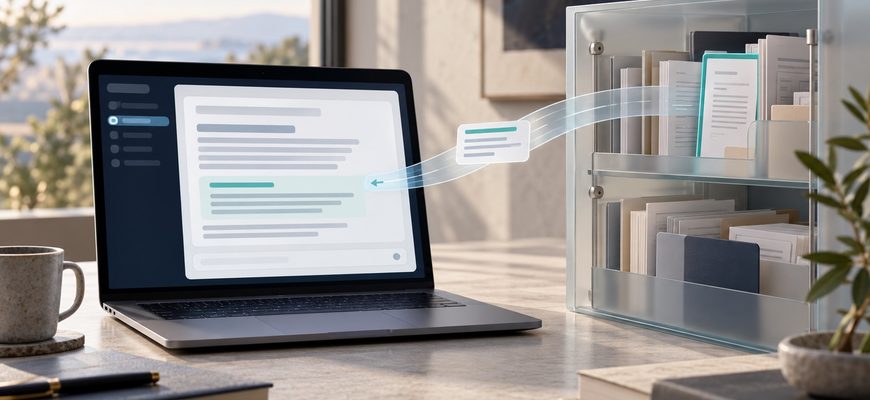
The model does not gain access merely because you mention a filename. The application around it needs a working route to the data, with the necessary permissions. That application can retrieve content and include it in the model’s input without asking you to drag the original file into the conversation.
The missing upload button is therefore a poor guide to what the assistant can see. The better guide is the combination of connected sources, effective permissions and the content actually returned.
The application can do the fetching for you
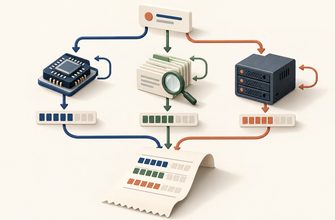
A language model processes the input supplied to it. In a tool-enabled assistant, that input can include results retrieved after your request arrives. The surrounding software handles the connection to the file or service, while the model works with the returned material.
This is the same separation involved when an AI agent requests a tool and the application executes it. The model might request a document search, receive several results and ask to read one. Alternatively, the application may provide relevant material automatically before asking the model to answer.
Protocols can organize those exchanges without granting unlimited access. The Model Context Protocol documentation distinguishes the host application from clients that communicate with individual servers. A connection mechanism is only part of the system; the server implementation and its credentials still determine what data it can return.
The file can arrive through a tool result
Selected content enters the model’s input: text, metadata, images or retrieved passages, depending on the tool.
The model uses that input to generate a response.
A cloud connection can replace a manual attachment
When you connect a document service, the authorization can cover more than the file currently open in the browser. Its scope depends on the integration and the permissions granted.
Google’s Drive API authorization guide illustrates the difference. It documents a per-file scope for files shared with an app and broader scopes that permit viewing and downloading Drive files available through the authorized account. These are different grants, even though both might appear to a user as “Connect Drive.”
That does not establish which scope a particular assistant uses. Check the integration’s actual authorization and administrative configuration rather than assuming every connection covers the same material.
Microsoft’s Copilot data-protection documentation describes another approach: access based on the user’s existing permissions, with additional search, sharing and information-protection controls. A document can be available because the user already belongs to a permitted group, without that user having individually attached it to the current chat.
Permission to access a broad shared library can make an assistant’s discovery feel surprising. That surprise does not, by itself, show that the assistant bypassed permissions. It may reveal that the existing sharing scope was broader than the user realized.
A desktop assistant can read a workspace directly
A local coding assistant operates in a different environment from a text-only web chat. Its host application can have file tools that read from the computer where it runs.
Claude Code’s permission documentation, for example, describes working directories, additional directories and separate rules for reading and editing. It also distinguishes application permissions from operating-system enforcement. The exact readable area depends on the effective configuration; a working-directory label should not be assumed to be the complete security boundary.
An editor integration may also provide selected text or open-file context. The assistant then has material you supplied through the application’s context mechanism, even if you never used a paperclip icon.
Conversely, typing a local path into a chat does not make the file readable unless the application has a tool or integration that can resolve that path and is permitted to do so. The path itself is text, not the document’s contents.
Sometimes the original file is never opened for this question
A company knowledge base may already contain extracted passages from its documents. A user asks a question; a retrieval service finds passages and sends them to the model. That is the basic mechanism behind retrieval-augmented generation, or RAG.
In that arrangement, someone or some configured process made the documents searchable earlier. You did not need to upload the source file yourself, and the answering model did not need to open the original PDF at question time.
This also explains why source access and retained content need separate attention. Disabling one connection does not establish what happened to text already stored elsewhere. The behavior of source files and derived search records depends on the application’s synchronization and retention design.
A filename is weaker evidence than a retrieved passage
Search results can expose a title, path or short preview without returning the complete document. A failed read may follow a successful search. Even a successful extraction might omit images, inaccessible sections or unsupported content.
An assistant saying “I found the file” therefore leaves an important question unanswered: what did it actually receive? A reliable explanation identifies the source and distinguishes a listing, a snippet, selected passages and a full-content read.
The same distinction applies to permissions. Read access does not inherently establish permission to modify the original, send it to another person or publish its contents. Those actions depend on separate tools, grants and application policies.
And reading a document for a response is not evidence that the underlying model was trained on it. Retrieval, conversation retention and use for training are separate questions. The access route alone cannot answer the latter two; the product’s applicable settings and policies matter.
If an assistant references a file you never attached, look for the route that supplied it: a cloud connection, local tool, editor context or knowledge index. The useful boundary is what the application can retrieve and pass onward, not whether you remember clicking Upload.