
Local AI, explained from model to server.
Practical guides to local LLMs, GPU hardware, VRAM, inference, RAG and AI server infrastructure. Understand what you need, why it matters and how the pieces fit together.
Explore Local AI Infrastructure
Start with the part of the local AI stack you want to understand.
Latest Guides
-

One Dirty Fiber Connector Can Slow an AI Cluster
A powerful AI cluster can depend on a fiber connection whose critical optical region is only micrometers across. Here’s how contamination affects signals, why network errors are difficult to diagnose and what engineers measure before replacing hardware.
-

Meta Built a Liquid-Cooled Network Rack. Not for GPUs.
Meta has unveiled IcePack, its first liquid-cooled network rack, alongside IceCube switches rated at 102.4 Tbps. Here’s why the networking equipment connecting AI accelerators has become a major cooling challenge of its own.
-
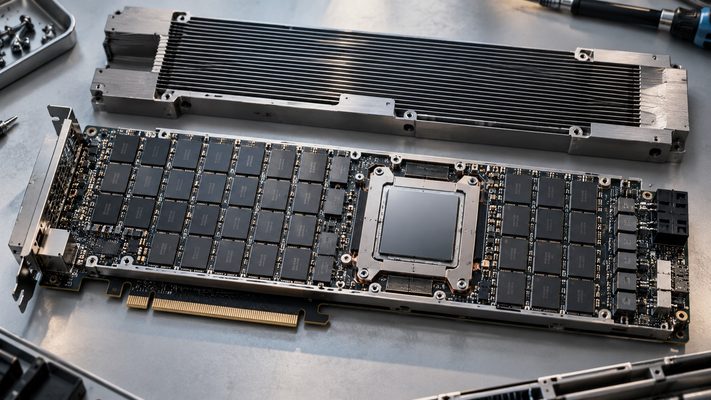
Intel’s New AI GPU Has 480GB of Memory. Why No HBM?
Intel’s GPU D-series introduces an unusual choice: up to 480GB of LPDDR5X memory instead of HBM. Here’s why memory capacity, bandwidth and power consumption can matter more than one headline specification when running large AI models.
-

Thousands of GPUs Can Make the Power Grid Oscillate
Thousands of GPUs can change their power consumption together, creating an unexpected challenge for electricity grids. New 2026 research reveals why synchronized AI workloads matter and how engineers are learning to control their impact.
-

AI Servers Are Arriving Before Data Centers Can Power Them
AI servers are arriving before data centers have enough power to run them. Discover why electricity shortages are delaying deployment, even as powerful new GPUs are ready to go.
-

You Deleted the File. Why Can Your AI Still Find It?
Deleting a document doesn’t always erase what your AI can find. Discover how RAG search indexes retain information, why deleted files may remain searchable, and how to verify that deletion actually worked.
-

Can a Website Trick Your AI Assistant?
You ask an AI assistant to read a webpage. But what if that page contains instructions meant for the AI instead of you? Here’s how prompt injection works and why it matters.
-

You Uploaded a PDF to AI. Did It Actually Read Every Page?
AI DOCUMENTS · WHAT HAPPENS AFTER UPLOAD You upload a 300-page PDF to an AI assistant. Seconds later, it gives you a tidy summary. It explains the main arguments, mentions important findings, and even sounds confident about the conclusion. You didn’t have time to read the entire report yourself. That’s why you uploaded it. But…
-

Does Incognito Mode Hide What You Tell AI?
You open ChatGPT in an incognito window, ask something personal, and close the tab. Is the conversation really private? Here’s what incognito actually protects.
-

You Deleted Your AI Chat. Is It Really Gone?
You deleted your AI conversation. It’s gone from the screen, but what happens behind the scenes? Follow the data through cloud servers, local storage, and AI memory.
-

What Actually Happens When You Ask AI a Question?
FOR BEGINNERS · INSIDE A SINGLE AI MESSAGE You type one question. Somewhere else, a computer begins building the reply. Here’s the trip your words take. Open an AI chat. Type “Why does the Moon change shape?” Press Send. A few moments later, an explanation appears. It feels immediate. But between those two moments, your…
-

Finland’s Sand Battery Heats Buildings With 2,000 Tons of Rock
A small Finnish town is heating buildings with 2,000 tons of crushed rock. Discover how this unusual sand battery works, why it stores heat instead of electricity, and what its first year of operation revealed.