- First, define “fit”
- A quick way to estimate model weight size
- 8GB VRAM: 8B is the comfortable lane
- 12GB VRAM: this is where 14B becomes practical
- 16GB VRAM: more quality, or more model
- 8GB vs 12GB vs 16GB: the practical table
- Why context can ruin a perfect-looking VRAM calculation
- More VRAM does not have to mean a bigger model
- Which VRAM tier should you target?
- The simple answer
- FAQ
The difference between an 8GB, 12GB and 16GB GPU is not just a few extra gigabytes. Each step changes which quantizations make sense, how much context you can keep, and whether a larger model runs entirely on the GPU or quietly spills into system RAM.
Here is the trap with local LLMs: people look at the size of the GGUF file, compare it with the number printed on the GPU box, and assume the arithmetic is finished. A 7GB model file and an 8GB card? Perfect. An 11GB file and a 12GB card? Also perfect. Unfortunately, the GPU has other bills to pay.
The model weights are only the largest tenant. The KV cache grows as your conversation gets longer. The inference engine needs working buffers. The driver uses memory. Multimodal models may need extra components. And if you leave almost no headroom, a configuration that technically loads can still be unpleasant to use.
So this guide uses a stricter definition of fits: the model should fit at a useful quantization with enough room left for an ordinary context window and normal runtime overhead.
GPU memory
This is where an 8GB card feels easy rather than experimental. Qwen3-8B and Llama 3.1 8B-class models are natural targets.
A GGUF file that is smaller than your graphics card is not automatically a comfortable fit. Context, KV cache and runtime buffers still need somewhere to live.
First, define “fit”
There are really three different meanings when someone says a local model “fits” on their GPU.
The quantized model file is smaller than the VRAM capacity. This is the easiest comparison — and the least useful one by itself.
The runtime successfully allocates weights, cache and buffers without an out-of-memory error. Better, but it may still leave almost no room for context.
You can use a sensible quantization, maintain a useful context window, and avoid immediate CPU offloading. This is the definition that matters in this guide.
A quick way to estimate model weight size
Before downloading anything, parameter count gives you a rough first pass. A four-bit model theoretically needs half a byte per parameter. Real files are somewhat larger because quantization formats carry scales, metadata and tensors stored at other precisions.
As a rough planning rule, a good Q4-class GGUF often lands somewhere around 0.55–0.65GB per billion parameters. Treat that as a planning estimate, not a promise. The real file size is the number that matters.
That puts an 8B model roughly in the 4–5GB neighborhood, a 14B model around 8GB-ish, and a 24B model well into the low-to-mid teens depending on the quantization.
Now add the part people forget: the model has to run after it loads.
8GB VRAM: 8B is the comfortable lane
Plenty of useful local AI fits here — as long as you resist the urge to turn every download into a memory stunt.
Eight gigabytes is enough to run genuinely capable local models. The mistake is treating it as a miniature 16GB card. It is much better to use a good 7B or 8B model at a healthy quant than to force a much larger model into an ultra-aggressive quantization with almost no context headroom.
This is also why an 8GB GPU can sometimes feel better with an 8B Q5 model than with a 14B model crushed into a very low-bit quant. More parameters do not automatically compensate for worse quantization, less context and slower CPU involvement.
12GB VRAM: this is where 14B becomes practical
Four extra gigabytes do more than the number suggests because they move an entire class of models out of “barely fits” territory.
Twelve gigabytes is a very useful local-LLM tier. Models around 12B to 14B can now be run at sensible Q4-class quantizations without immediately turning the rest of the VRAM budget into a crisis.
Qwen3-14B is a good example. The official model has 14.8 billion parameters. A Q4-class quant is therefore the kind of workload that naturally belongs much closer to a 12GB card than an 8GB one.
The catch is context. A model can have an advertised context window far larger than you should actually allocate on a 12GB card. Maximum context length and comfortable local context length are two completely different numbers.
16GB VRAM: more quality, or more model
This tier gives you a useful choice: run 14B models at better quantization, or start pushing into the 20B-plus range.
Sixteen gigabytes changes the conversation again. Instead of asking only “what is the largest model I can squeeze in?”, you can choose between a larger model and a higher-quality quant of a smaller one.
A 14B model at Q5 or Q6 can be a much nicer everyday setup than a borderline 24B model consuming almost every available gigabyte.
This is the point where people often discover that 16GB is not “almost 24GB.” A 24B or 27B-class model can be close enough to look tempting while still leaving too little room for the cache and runtime.
8GB vs 12GB vs 16GB: the practical table
| Model class | 8GB | 12GB | 16GB | What it means |
|---|---|---|---|---|
| 7B–8B Q4 | Easy | Easy | Easy | Plenty of room for ordinary context and runtime overhead. |
| 7B–8B Q8 | Tight | Good | Easy | Higher precision costs memory that may be better spent on context. |
| 12B–14B Q4 | Tight | Good | Easy | This is where 12GB becomes meaningfully better than 8GB. |
| 14B Q5 / Q6 | Offload | Depends | Good | 16GB lets you spend memory on quality instead of just model size. |
| ~20B Q4 | Offload | Tight | Practical | Exact quant size becomes important. |
| 24B Q4 | Offload | Offload | Edge case | Some builds can approach 16GB, leaving little room for context. |
| 27B–30B Q4 | Offload | Offload | Usually offload | This is where 20GB–24GB+ GPUs become much more natural. |
Why context can ruin a perfect-looking VRAM calculation
Suppose your quantized model leaves 3GB free. That sounds generous until you ask for a long context window.
During inference, the model keeps key and value tensors for previous tokens. This is the KV cache. Longer prompts and longer conversations mean more cached state.
Qwen3-14B, for example, has 40 layers and eight KV heads. With a traditional 16-bit KV cache, a 32K-token sequence works out to roughly 5GB of cache before other allocations. Modern runtimes can use lower-precision KV cache formats, but the example shows why the advertised context maximum is not free.
This is why “128K context supported” should never be read as “128K context is sensible on my 8GB GPU.” Model architecture, KV precision and backend matter enormously.
More VRAM does not have to mean a bigger model
There is another way to spend those extra gigabytes: keep the same model and use a better quant.
Imagine you already like a particular 14B model. Moving from 12GB to 16GB does not force you to chase a 24B model. You can use Q5 or Q6 instead of Q4, keep a larger context window and still avoid CPU offloading.
For day-to-day use, that can be the better upgrade. A slightly smaller model that lives comfortably in VRAM is often more pleasant than a larger model constantly leaning on system memory.
Do not judge a graphics card only by the largest GGUF file someone managed to load once. Judge it by the model, quantization, context and speed you can use every day.
Which VRAM tier should you target?
It is enough for useful local chat, coding, summarization and experimentation. Just do not buy it expecting comfortable 14B-plus workloads.
This is one of the most meaningful steps up for local LLM use. It moves a useful model class from compromise territory into normal everyday operation.
You get more freedom, but 24B–30B models can still exceed the comfort zone. Sixteen gigabytes is a strong tier, not unlimited memory.
The simple answer
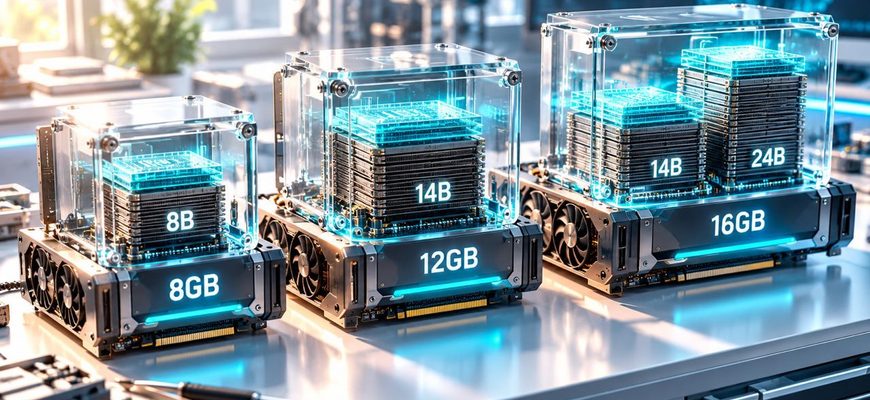
8GB: think 7B–8B. That is where the card can run a useful quant without constantly fighting the memory ceiling.
12GB: think 12B–14B. This is the point where models such as Qwen3-14B and Gemma 3 12B become much more natural local workloads.
16GB: think higher-quality 14B or roughly 20B-class Q4. Some 24B builds can be squeezed in, but the memory margin becomes thin quickly.
And regardless of the number on the GPU box, remember the rule that saves the most frustration: leave room for the model to run, not just to load.
FAQ
Is 8GB VRAM enough for local LLMs?
Yes. Eight gigabytes is a useful local-LLM tier for 7B and 8B-class models at Q4 or Q5 quantization. Larger models may require lower precision, reduced context or CPU offloading.
Is 12GB VRAM much better than 8GB for AI?
For local LLM inference, yes. The extra 4GB can move 12B–14B Q4 models from borderline territory into a much more practical full-GPU setup.
Is 16GB VRAM enough for a 24B model?
Sometimes, with a sufficiently small Q4-class quant and conservative context settings. It should be treated as a tight configuration rather than a guaranteed comfortable fit because cache and runtime allocations also consume VRAM.
How much VRAM should remain free after loading a model?
There is no single fixed number because model architecture, context, backend and KV-cache precision differ. The important part is to avoid selecting a weight file that consumes almost the entire card before inference begins.
Is Q4 always better than using CPU offloading?
No. A higher-quality quant with modest CPU offloading can sometimes be preferable to an aggressively compressed model. The right choice depends on how much generation speed you are willing to trade for model quality.
Does a longer context window need more VRAM?
Yes. The KV cache grows with the number of tokens held in context. Quantized KV-cache formats can reduce the cost, but long context is never free.